Free · No account · No subscription
AI that lives on your computer.
Turn off your internet. It keeps working. Everything you type stays on your machine. Always.
Nothing you type ever leaves your computer.
What this is, and what it isn't
A public service campaign, not another app to depend on.
Unplugged isn't meant to be the AI app you use every day for years. You're welcome to chat with it as often as you want, for as long as you want. It's yours and it's free. But that's not why it exists.
It exists so that everyday people, especially people who aren't technical, can see for themselves what AI really is, and don't get swept up in the hype of corporate AI. Once you've seen it, you'll know you have options.
It's one file.
The AI inside Unplugged is a single 720 MB file: Google's free Gemma model. No server, no cloud, no company on the other end.
It's not magic.
Every word is calculated by your own processor or graphics card. The app shows you the graph spike while it writes.
It can't read you back.
The AI file is read-only. It doesn't record what you type, doesn't learn from you, and doesn't know who you are. The app proves it with a fingerprint check.
Try it yourself
Download it, open it, and follow the 8-step tour. At step 3 you turn off your own internet, and watch it keep working.
Unplugged runs on a computer, not a phone.
Open this page on your Windows PC, Mac, or Linux computer:
keepailocal.org
Copied!
Downloads open very soon.
We're putting the finishing touches on the Windows, Mac and Linux versions. Follow #KeepAILocal to hear the moment they're ready.
About 750 MB · free · no sign-up
Your download has started. Windows will ask you to confirm a few times. Here's exactly what to click:
- Edge shows "Unplugged-Setup… isn't commonly downloaded". Click the ••• next to it, then Keep.
- On "Make sure you trust…", click the small arrow next to Delete, then Keep anyway. (See the picture.)
- Open the downloaded file. At "Windows protected your PC", click More info, then Run anyway.
- That's it: Unplugged installs and opens by itself.
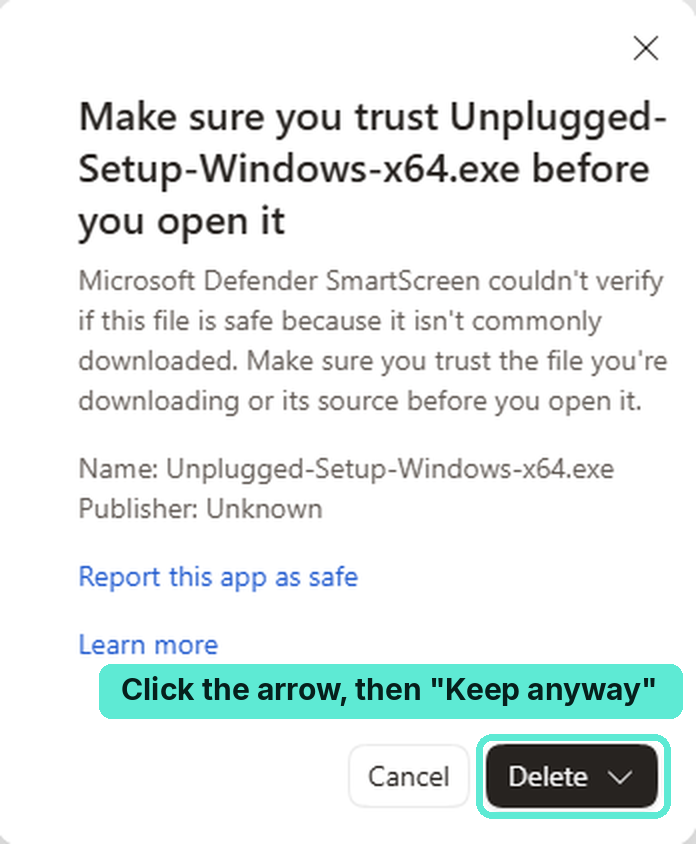
Using Chrome? It says "isn't commonly downloaded" too: click Keep. Want to help? Click "Report this app as safe" in that box. It helps the warning disappear for everyone.
Downloads come straight from GitHub, where you can also read every line of the source code. Check the download's fingerprint.
Heads up: your computer will warn you. We know.
When you open Unplugged the first time, Windows or macOS will show a scary-looking warning. That's because the app isn't "code-signed", which costs hundreds of dollars every year. Unplugged is free and has nothing to sell, so we skipped it. The warning means "we don't know who made this", not "this is dangerous". The code is public on GitHub for anyone to check.
Windows
When Edge says the download "isn't commonly downloaded": ••• → Keep, then the arrow next to Delete → Keep anyway. Open the file. At "Windows protected your PC": More info → Run anyway.
It then installs and opens Unplugged by itself. No admin password needed.
Mac
Open the .dmg and drag Unplugged into Applications. At "Apple could not verify…", click Done, then System Settings → Privacy & Security → Open Anyway.
Only needed the first time.
Linux
No warning. Right-click the AppImage → Properties → allow it to run as a program, then double-click it.
Or in a terminal: chmod +x Unplugged*.AppImage
- Open Unplugged and say hi to the AI.
- Turn off your internet: the app shows you how, step by step.
- Open a website to prove it's off. It won't load.
- Talk to the AI again. Still working. Nothing leaves your computer.
Works on most computers from the last several years. A graphics card makes it faster, but it isn't required.
Why this matters
Let's be honest: the AI in this app is small. It isn't as smart as the big cloud AIs today, and that's okay. That's not the point.
Corporations are not the enemy.
Many of them build amazing things. One of them, Google, even gave away the AI inside this app for free.
But they'll want you to believe that the only way to have the AI of the future is to pay them for it, every month, forever.
That is simply not true.
And local AI will keep getting better, year after year, as long as it's allowed to stay open and free.
Some people will tell you that local AI is dangerous.
Like anything else, it can be used for good or for bad.
But they'll try to tell you it's too dangerous for you to have freedom and complete privacy. Privacy that hasn't existed since the dawn of the internet age.
Don't let them get away with it.
What about data centers?
People have real concerns about data centers: the electricity and water they use, and what they mean for the towns around them. Those concerns deserve to be taken seriously.
But local AI doesn't replace data centers. The AI in Unplugged was trained in one. Today there's simply no other way to train large, capable models, and that work keeps a lot of people employed, including software engineers like me.
So this isn't local AI versus data centers. Data centers train the models. Local AI lets you run them on your own terms.
My own guess: as models keep getting more efficient, we'll need fewer data centers in the future, not more. We're just not there yet.
If AI only exists on company servers, every thought you share with it is stored on someone else's computer. Local AI is how privacy survives the AI age.
Not all "local AI" is the same.
Some companies will tell you their AI is "local" because it runs on your machine. But running on your machine doesn't automatically make it private, or yours.
Some of those same apps won't hesitate to collect data about how you use them, or to decide which questions you're allowed to ask. And it will all be done in the name of security and protection.
Security and protection are important. But they can also be used to manipulate you, for commercial interests.
How to tell if your AI is really local:
- Turn off your internet. Does it still work, completely? Real local AI doesn't need to phone home.
- Read what it collects. Look for "usage data", "analytics", "telemetry" or "diagnostics" in its privacy policy or settings. Real local AI has nothing to collect.
- Can you choose the AI model? If you can swap in any open model you like, you're in control. If you can't, someone else is.
- Can anyone check the code? Open-source apps can be inspected by anyone. "Trust us" isn't proof.
Unplugged passes all four: it works with the internet off, collects nothing, uses a standard open model file you can replace with another one, and every line of its code is public.
What your computer can already do, offline
- Write, rewrite and proofread emails, letters and résumésAny computer
- Summarize your own documents and ask questions about themAny computer · faster with a GPU
- Translate between languagesAny computer
- Ask private questions about health, money, legal matters or relationshipsAny computer
- Turn recordings and meetings into textAny computer · faster with a GPU
- Homework help, without a company collecting your kids' dataAny computer
- Coding helpGraphics card recommended
- Read text in photos and describe imagesGraphics card recommended
- Make images and artGraphics card, ~8 GB+ video memory
- Make short video clipsPowerful graphics card, ~12–24 GB+
Image and video generation are the hardest jobs there are for a computer. They won't work on every machine today, and most need a good graphics card. A few years ago they needed a data center. They're on the same path as the text AI in Unplugged, and in the future they'll run on even the most modest computer, privately, with no internet, if we keep it legal and open.
Honestly? You don't need our app.
There's a whole open community already doing all of this, for free, and it's been growing for years. Unplugged is just the proof. Here's where the real thing lives:
huggingface.co
OllamaThe easiest way to download and run AI models on your own computer.ollama.com
LM StudioA friendly desktop app: pick a model, download it, chat. Offline after download.lmstudio.ai
JanAn open-source, offline-first chat app for your own computer.jan.ai
GPT4AllBeginner-friendly local chat that can also read your own documents privately.nomic.ai/gpt4all
llama.cppThe open engine that powers most local AI, including Unplugged.github.com/ggml-org/llama.cpp
r/LocalLLaMAThe biggest community of people running AI at home. Friendly to beginners.reddit.com/r/LocalLLaMA
ComfyUIMake images and video on your own graphics card.comfy.org
Don't trust us. Verify it.
Read the code
Unplugged is open source. It contains no networking code, no tracking, no analytics and no update checks. See it on GitHub.
Block it, it still works
Turn off your Wi-Fi, unplug the cable, or block Unplugged in your firewall. It works exactly the same, because it never needed the internet.
Check the fingerprints
The app shows the AI file's SHA-256 fingerprint and checks it against the one published on Hugging Face. Each download's fingerprint is listed on its GitHub release page.
AI model fingerprint (gemma-3-1b-it-qat-Q4_0.gguf): ef60e4e91a738c99ae9976b050657dfe68a4007a0ccca121b55ec0c413dccd58
Questions
Is Unplugged meant to be my everyday AI app?
Not really, though you can use it as much as you like, for as long as you like. Unplugged is a public service campaign: a free, five-minute proof that AI can live on your own computer. If you want to go further, the open community has wonderful everyday apps. See where to go next.
Is it as smart as ChatGPT?
No, not today, and that's not the point. This small AI proves AI can live on your own computer with no internet at all. Local models are improving fast: in a few years the same and better will run on ordinary computers, as long as open models stay available.
Do I need the internet to use it?
Only once, to download it, like buying a book. After that, never again.
Does it work without a graphics card?
Yes. It runs on your computer's regular processor. A graphics card makes it faster, but it isn't required.
What happens to what I type?
Nothing. It stays in your computer's temporary memory and disappears when you close the app. It's never sent anywhere and never saved. The AI file itself is read-only and can't record anything.
Is it really free? What's the catch?
There's no catch. No account, no ads, no data collection, no upgrade. Keep AI Local is one software engineer with nothing to sell, who wants people to know this is possible.
Which AI is inside?
Google's Gemma 3 1B, the smallest Gemma made for conversation. Gemma is provided under and subject to the Gemma Terms of Use found at ai.google.dev/gemma/terms, including the Gemma Prohibited Use Policy.
Why does my computer warn me about Unplugged?
Because we didn't pay for code signing. Microsoft and Apple charge yearly fees to "vouch" for an app; without that, they show a warning for any download they don't recognize. Unplugged is a free project with nothing to sell, so we skipped it. You can read every line of the code on GitHub, and check each download's fingerprint on its release page. See how to open it.
Does this website track me?
No. No cookies, no analytics, no trackers, no fonts or scripts loaded from anywhere else. It would be a strange way to talk about privacy otherwise.
Who's behind this?
Just me: a software engineer. There's no company behind this, no investors, no ads, and nothing to sell. Unplugged is free, and I have no stake in it at all.
I simply believe that everyone, everywhere, should have options when it comes to AI.
Get Unplugged, freeThe first time I realized that the true power of AI lay not on a cloud server, but on my desktop, inside my own computer, it changed my life.
I hope it changes yours too.
Keep AI local. #KeepAILocal